Configuration Guide for Ethical Gardeners Simulation
This tutorial explains how to configure the Ethical Gardeners simulation environment using Hydra. You’ll learn about all available configuration options, their meanings, and how to customize your experiments.
Hydra Configuration System Overview
Ethical Gardeners uses Hydra for configuration management, providing a modular and flexible way to configure simulations without modifying code.
Configuration Structure
The configuration is organized into several groups:
configs/
├── config.yaml                # Main configuration file with defaults
├── grid/                      # Grid initialization configurations
│   ├── random.yaml            # Random grid generation
│   ├── from_code.yaml         # Code-defined grid layout
│   └── from_file.yaml         # File-based grid layout
├── observation/               # Observation strategy configurations
│   ├── total.yaml             # Full visibility
│   └── partial.yaml           # Limited visibility
├── metrics/                   # Metrics collection configurations
│   ├── none.yaml              # No metrics
│   ├── export.yaml            # Export to CSV
│   ├── send.yaml              # Send to monitoring services
│   └── full.yaml              # Export and send
└── renderer/                  # Visualization configurations
    ├── none.yaml              # No visualization
    ├── console.yaml           # Text-based visualization
    ├── graphical.yaml         # Graphical visualization
    └── full.yaml              # Both console and graphical
Main Configuration Parameters
These parameters control basic simulation behavior and are defined in config.yaml:
# General configuration
random_seed: 42           # Seed for reproducible experiments
num_iterations: 1000      # Maximum number of simulation steps
render_mode: "human"      # "human" for real-time display, "none" for headless
Grid Configuration
The grid configuration controls the simulation environment layout, including dimensions, obstacles, agents, and flowers.
Initialization Methods
Three initialization methods are available:
Random (grid=random)
Generates a random grid with configurable parameters:
init_method: "random"
width: 10                # Grid width
height: 10               # Grid height
obstacles_ratio: 0.2     # Percentage of obstacles
nb_agent: 2              # Number of agents
From Code (grid=from_code)
Creates a grid with predefined cell configurations:
init_method: "from_code"
config:
  width: 10
  height: 10
  cells:                 # Explicitly defined cells
    - position: [4, 4]
      type: OBSTACLE
  agents:                # Explicitly defined agents
    - position: [1, 1]
      money: 0
      seeds:
        0: 10            # 10 seeds of type 0
        1: 10            # 10 seeds of type 1
From File (grid=from_file)
Loads a grid from a text file:
init_method: "from_file"
file_path: "grid_config.txt"
the file should be formatted as follows:
First line: width height
Grid representation: G (ground), O (obstacle), FX_Y_Z (ground with flower type X planted by agent of id Y at growth stage Z), AX (ground with agent ID X)
Agent definitions: ID,money,seeds (of type 0| of type 1| of type 2)
Flower types definitions: type,price,pollution_reduction (for stage 0| stage 1| stage 2)
grid_config.txt¶10 10 G G G O O G G G G G G F0_2 G G G O G G G G G O G A0 O G G G G G G G G G O G G G G G O O O O O G G G G G G G G G G G G G G G G G G G G G G A1 G G G G G G G G G G G G G G G G G G G G G G G G G G G G G G G G 0,100,5|10|3 1,100,5|10|3 0,10,1|2|5 1,5,0|1|3 2,2,0|1
Common Grid Parameters
These parameters apply to all initialization methods:
min_pollution: 0           # Minimum pollution level for a cell
max_pollution: 100         # Maximum pollution level for a cell
pollution_increment: 1     # Pollution increase per step for cells without flowers
num_seeds_returned: 1      # Number of seeds obtained when harvesting a flower
collisions_on: true        # Whether agents can occupy the same cell
Flower Configuration
Flowers are defined in the flowers_data parameter in the grid configuration:
flowers_data:
  0:                       # Flower type 0
    price: 10              # Money earned when harvested
    pollution_reduction: [0, 0, 0, 0, 5]  # Pollution reduction at each growth stage
  1:                       # Flower type 1
    price: 5
    pollution_reduction: [0, 0, 1, 3]
  2:                       # Flower type 2
    price: 2
    pollution_reduction: [1]
The pollution_reduction list defines how much pollution is reduced at each growth stage. The length of this list determines how many growth stages the flower type has.
Observation Configuration
The observation configuration determines how agents perceive the environment:
Total Observation (observation=total)
Agents have complete visibility of the entire grid. For each cells, they can see:
Cell type (normalized)
Pollution level (normalized)
Flower presence and type (normalized)
Flower growth stage (normalized)
Agent presence (normalized)
Agent X position (normalized)
Agent Y position (normalized)
type: "total"
Partial Observation (observation=partial)
Agents can only see cells within a certain range. For each cell in the range, they can see the same information as in total observation:
type: "partial"
range: 1                 # Number of cells visible in each direction
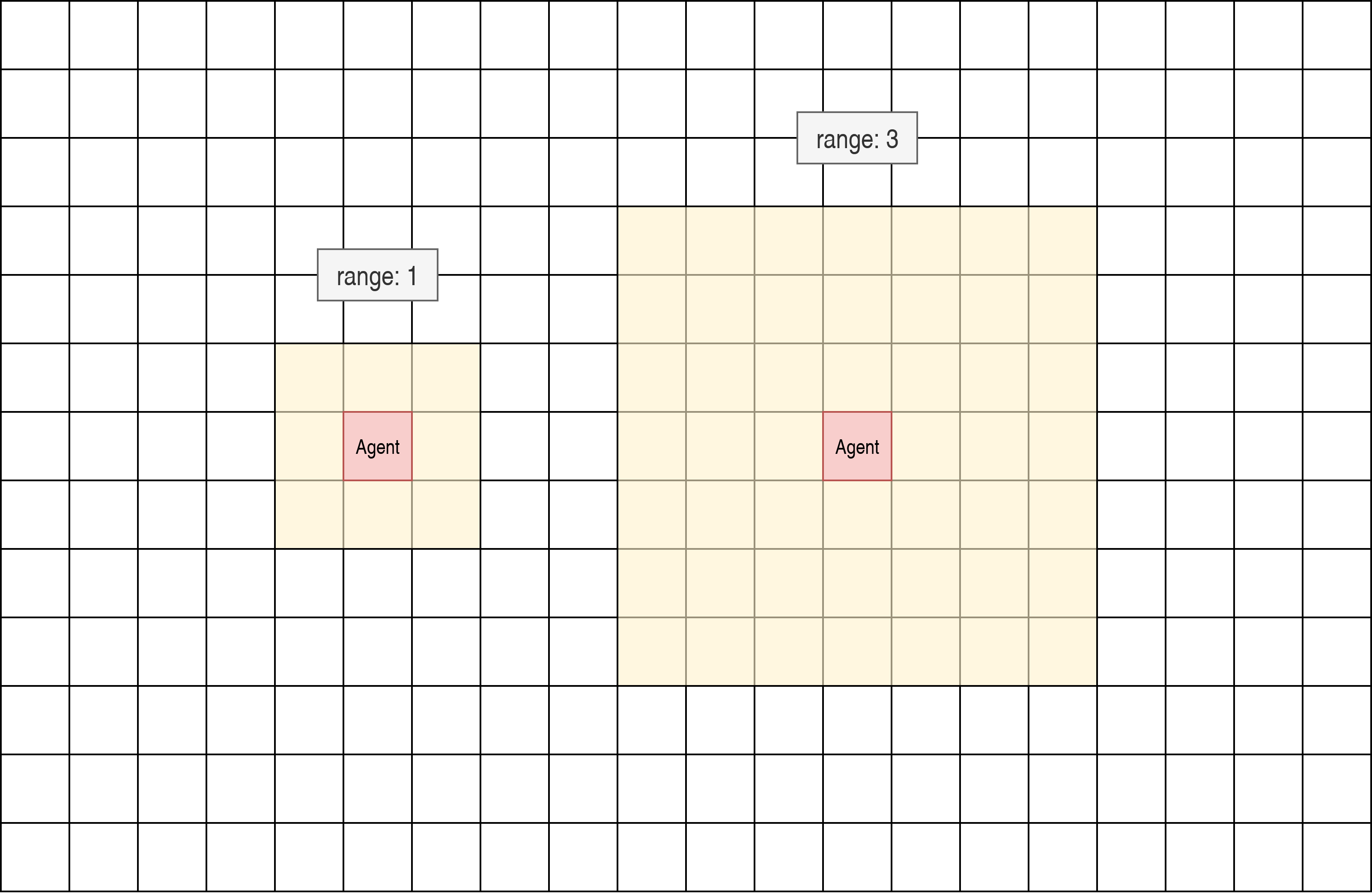
The observation is a 2*range+1 by 2*range+1 square centered on the agent.
Metrics Configuration
The metrics configuration controls how simulation data is collected and exported:
out_dir_path: outputs/${now:%Y-%m-%d}/${now:%H-%M-%S}  # Directory for metrics output
export_on: true                                        # Export metrics to CSV files
send_on: false                                         # Send metrics to external services (e.g., Weights & Biases)
Collected metrics include:
Step count
Flower statistics (planted and harvested, per agent and total)
Pollution levels (average and thresholds)
Agent rewards
Currently active agent
Hydra supports dynamic expressions, so you can use ${now: } with:
%Y: Year
%m: Month
%d: Day of the month
%H: Hour (24-hour clock)
%M: Minute
%S: Second
By default, the output directory will be outputs/YEAR-MONTH-DAY/HOUR-MINUTE-SECOND. This directory will store the csv file named simulation_metrics.csv as well as the hydra configuration used for the simulation in the .hydra directory and the logs.
Weights & Biases parameters
When metrics.send_on is true, you can pass any wandb.init parameters under metrics.wandb. If you don’t set them, the default values are
project: ethical-gardeners
name: run_<timestamp>
reinit: create_new
Example:
metrics:
  out_dir_path: outputs/${now:%Y-%m-%d}/${now:%H-%M-%S}
  export_on: true
  send_on: true
  wandb:
    project: ethical-gardeners
    entity: your-entity
    name: run_1234567890
    group: ethicsai
    tags: [simulation]
    reinit: create_new
    config:
      random_seed: 42
      grid_width: 10
      grid_height: 10
See Weights & Biases documentation for more details on available parameters.
Renderer Configuration
Two types of renderers are available and can be used individually or together:
Console Renderer (renderer.console.enabled=true)
Text-based visualization in the terminal:
console:
  enabled: true
  post_analysis_on: false                                 # Save graphical visualization as video by creating a GraphicalRenderer without display
  out_dir_path: outputs/${now:%Y-%m-%d}/${now:%H-%M-%S}   # Directory for video output
  characters:                                             # Customizable characters for different elements
    ground: " "
    obstacle: "#"
    agent: "A"
    flower: "F"
Graphical Renderer (renderer.graphical.enabled=true)
Graphical visualization using Pygame:
graphical:
  enabled: true
  post_analysis_on: false                                 # Save visualization as video
  out_dir_path: outputs/${now:%Y-%m-%d}/${now:%H-%M-%S}   # Directory for video output
  cell_size: 50                                           # Size of each cell in pixels
  colors:                                                 # Customizable color scheme
    background: [255, 255, 255]
    obstacle: [100, 100, 100]
    ground: [70, 255, 70]    # define the red and blue components of the displayed ground color
                             # The green component changes dynamically based on pollution level
Advanced Configuration Examples
Customizing Agent Count and Initial State
To create a simulation with a specific number of agents and initial resources:
with from_code initialization:
init_method: "from_code"
config:
  width: 15
  height: 15
  agents:
    - position: [1, 1]
      money: 100
      seeds:
        0: 20
        1: 10
        2: 5
    - position: [13, 13]
      money: 50
      seeds:
        0: 5
        1: 15
        2: 10
    - position: [7, 7]
      money: 75
      seeds:
        0: 10
        1: 10
        2: 10
with from_file initialization:
init_method: "from_file"
file_path: "custom_grid.txt"
custom_grid.txt:
15 15
G G G G G G G G G G G G G G G
G A0 G G G G G G G G G G G G G G
G O G G G G G G G G G G G G G
G G G G G G G G G G G G G G G
G G G G G G G G G G G G G G G
G G G G G G G G G G G G G G G
G G G G G G G G G G G G G G G
G G G G G G G A1 G G G G G G G
G G G G G G G G G G G G G G G
G G G G G G G G G G G G G G G
G G G G G G G G G G G G G G G
G G G G G G G G G G G G G G G
G G G G G G G G G G G G G G G
G G G G G G G G G G G G G A2 G
G G G G G G G G G G G G G G G
0,100,20|10|5
1,50,5|15|10
2,75,10|10|10
Customizing Flower Types
To modify the number and properties of flower types:
flowers_data:
  0:  # Expensive, slow-growing flower with high pollution reduction
    price: 25
    pollution_reduction: [0, 0, 0, 2, 5, 10]
  1:  # Medium-priced, medium-growth flower
    price: 10
    pollution_reduction: [0, 1, 3, 5]
  2:  # Cheap, fast-growing flower with low pollution reduction
    price: 5
    pollution_reduction: [1, 2]
  3:
    price: 15
    pollution_reduction: [0, 0, 1, 2, 4]
with from_file initialization, custom_grid.txt contains:
10 10
G G G O O G G G G G
G F0_2 G G G O G G G G
G O G A0 O G G G G G
G G G G O G G G G G
O O O O O G G G G G
G G G G G G G G G G
G G G G G G G G G G
G G G G G G G G G G
G G G G G G G G G G
G G G G G G G G G G
0,100,5|10|3
0,25,50|0|0|2|5|10
1,10,0|1|3|5
2,5,1|2
3,15,0|0|1|2|4
How to modify the Configuration
the configuration can be modified in two ways:
Create or modify YAML files: Create custom configuration files in the appropriate directories.
Command-line overrides: Override specific configuration values when launching the simulation (See the Launching the Ethical Gardeners Simulation tutorial).
When specifying configurations, it’s important to follow Hydra’s hierarchical structure with proper indentation:
# Example of proper configuration structure
grid:
  init_method: "random"
  width: 10
  height: 10
  obstacles_ratio: 0.2
  num_seeds_returned: 2

observation:
  type: "partial"
  range: 1

metrics:
  out_dir_path: outputs/${now:%Y-%m-%d}/${now:%H-%M-%S}
  export_on: true
  send_on: false

renderer:
  console:
    enabled: true
    post_analysis_on: false
    out_dir_path: outputs/${now:%Y-%m-%d}/${now:%H-%M-%S}
    cell_size: 50
    colors:
      background: [255, 255, 255]
      obstacle: [100, 100, 100]
  graphical:
    enabled: false
For command-line overrides, use dot notation to specify the hierarchical path:
python -m ethical_gardeners grid.width=20 grid.height=20 observation.range=3
For a complete example configuration, see full configuration example.